


Live streaming video has become one of the major channels of communication in today’s internet. Video streaming services for businesses allow businesses to live stream their events effortlessly these days.
However, live streaming an event is not as simple as you can’t just go live on social media with a cellphone camera and expect it to look professional and engaging.
In this blog, we’re going to take a look at why live streaming events can be extremely beneficial for businesses and how to do it the right way!
What is Webcasting?
Webcasting is a simple idea. You share video or audio over the internet, and people can watch it from anywhere. It is like a TV broadcast, but online. The only thing you need is a device and an internet connection.
It can be live. That means people watch it as it happens. Or it can be saved and watched later. Both work just fine.
People use webcasts for many things. Events. Classes. Company updates. Even casual talks. The goal is the same. Reach more people without asking them to be in the same place.
Platforms like YouTube Live or Facebook Live make this easy. You start a stream, and others can join with a simple click.
Working of a Webcast: An Overview
The process is easier than it sounds. First, you record video or audio using a phone or computer. This content is then sent to the internet through a streaming service.
That service acts like a bridge. It takes your video and sends it out to viewers. People can open a link or app and start watching right away.
If it is a live webcast, everything happens in real time. If it is recorded, viewers can press play whenever they want.
Most platforms handle the bulky work. They manage the stream, adjust quality, and make sure it runs smoothly on different devices. This is why webcasting feels so simple on the surface, even though a lot is happening behind the scenes.
Why Should Companies Live Stream Events?
There are many reasons why you should live stream business events. In fact, considering the number of online streaming services available for corporate events these days, there is hardly any reason not to!
Here are some of the major reasons why you should live stream corporate events:
- While it can sound counterintuitive, video streaming services for businesses actually helps in increasing the attendees of the event. When you go live on social media with your event, you increase your event’s reach which makes people want to attend the next one.
- When companies webcast live streaming events, especially events such as town hall meetings, they save up a lot of costs as many employees can attend the event without traveling.
- Most live streaming vendors and live webcasting vendors usually provide the option to monetize live stream to corporates so corporates can actually increase revenue by live-streaming their events.
- Video streaming services for businesses also usually provide a full recording of the entire live stream which can then be used for different purposes like marketing or archiving.
How to Live Stream Events
YouTube live streaming for business marketing is a growing trend these days and a lot of companies are using live streaming as a way to reach more people and market their business. However, there are a lot of aspects to live streaming an event.
1. Equipment
While some video streaming services for businesses also provide equipment to do the same, most online streaming services require additional equipment. The first major equipment you would need is the camera that will capture the video which will then be live-streamed. There are a lot of cameras these days that are made to webcast live streaming events.
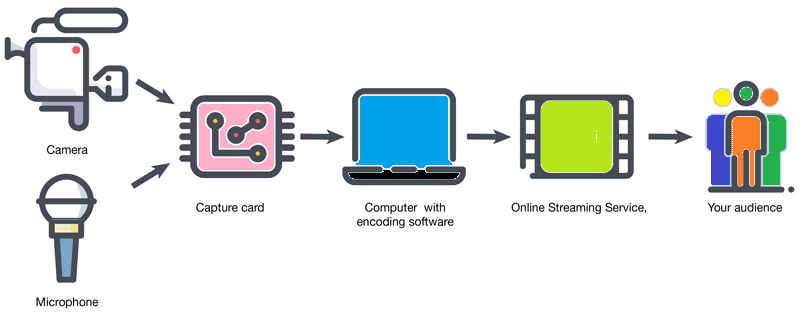
Other equipment requirements for live streaming include high-quality microphones, lights, and in some cases, hardware encoders that’ll transcode the live video in real-time but it can be done with software too. There are also some software requirements to ensure the best quality when you live stream your event but most online streaming services provide their own software these days.
2. Location

Once you have decided on your equipment, there are still a few steps left before you can go live on social media and create the perfect live stream for your event.
Any decent social media live streaming guide will tell you that location can often end up dictating the overall quality of your live stream.
It is important to set up your camera in a good location that’ll allow you to film the entire event. A lot of live streaming vendors and live webcasting vendors can provide services to help you stream effectively but where you place your camera will be largely dependent on your choices only.
It can be a good idea to scout the location of the event beforehand and set up the camera to get the best angles during the event.
3. Setting it all up

Once you have the equipment and location locked up, it is time to set it all up! In order to effectively use youtube live streaming for business marketing, the most important thing is to ensure your content is glitch-free and perfect.
Doing a practice run before the real event can help you in ensuring that everything is set up correctly. You can find some sort of a checklist in almost every social media live streaming guide that can help you set everything up.
Once you have set up your equipment and ensured everything is working properly like networking, the lights, and other things, you’re ready to go live on social media with your event!
4. Managing the live stream
While online streaming services have made it a lot easier to do so, managing the live stream is one of the most important steps in the whole process.
While some live streaming vendors and live webcasting vendors will provide you assistance in managing the stream, some of the vendors will leave the entire thing for you to handle.
When done right, managing the live stream can actually make the entire stream more engaging and enjoyable for the audience of the stream.
Tips for Live Streaming Events
There are some other things that you can do to increase your event’s reach and quality when you decide to webcast live streaming events. Here are some tips that can help you use live streaming effectively and youtube live streaming for business marketing.
- When it comes to equipment, it is better to have a simple set-up that works rather than a complex set-up that can be hard to use.
- It is also a good idea to have a backup for every piece of equipment so even if the main equipment fails, the live stream can be conducted successfully.
- Pay proper attention to audio. Almost every social media live streaming guide fails to state how important audio can be.
- Double-check everything before the stream! When it comes to live streaming, it is always better to be prepared as much as possible.
Conclusion
While live streaming corporate events may seem simple on the surface, it actually requires a lot of thought, time, and other resources. We hope this guide was a great starting point for your research into live streaming events for your corporation.
In case you’re looking for a live streaming partner, we are a dedicated live streaming company and we provide end-to-end support when it comes to live streaming. We handle everything from equipment, network, management of the stream, and everything in the middle!
Connect with the Industry's Most Experienced
Live Streaming Service Providers.
FAQs
1. What is webcasting?
It is sharing video or audio over the internet so people can watch live or later from anywhere, using just a device and internet connection.
2. What equipment do you need to live stream a business event?
You need a good camera, microphones, proper lighting, and encoding software. Some streaming vendors provide this equipment as part of their service.
3. How important is location when setting up a live stream?
Very important. The camera placement affects the overall video quality, so scouting the venue beforehand helps get the best angles and coverage.
4. What are the top tips for a successful live stream?
Keep the setup simple, have backup equipment ready, focus on clear audio, and always do a full test run before going live.